
A logistics coordinator spends the first two hours of every day copying shipment data between three systems that don't talk to each other. That's not a technology gap. It's an operational bottleneck, and it's exactly the kind of repetitive task businesses using ai are quietly removing right now. Multiply that coordinator across a dozen roles and you get the real cost: entire salaried hours spent on work that no person needs to touch. This article breaks down what "using AI" actually means. It shows where AI removes manual work and how to find which parts of your operation are worth automating.
What 'businesses using AI' actually means (plain-English definition)
Strip away the marketing and it's simple. A business using artificial intelligence applies software that can interpret data, learn patterns, or generate output. Then it hands that software work a person used to do by hand. That covers a chatbot answering routine questions, a forecasting model predicting demand, and a tool that reads invoices and files them automatically. The point isn't the technology label. It's the removal of manual work from a specific process, the essence of AI workflow automation that removes repetitive work.
Most ai in business today falls into a handful of practical buckets, not science-fiction autonomy. Adoption has climbed fast. McKinsey's State of AI report tracks how quickly organizations have folded these ai tools into everyday business operations. What matters is whether a tool reduces effort on a task your team repeats often. The label on the software rarely tells you that; the workflow it sits inside does.
How AI works in a business context, core building blocks (machine learning, NLP, generative AI, automation)
Four building blocks cover almost everything businesses use. Machine learning spots patterns in past data and predicts what comes next, which is how it powers demand forecasting and predictive analytics. Natural language processing lets software read and respond to human text, so it can sort support tickets or pull key terms out of contracts. Generative AI produces new content, from draft emails to summaries of long reports. Process automation stitches these together, moving data between systems without a person copying and pasting.
Here's why that matters: none of these replace judgment. They handle the predictable middle of a workflow, the part that follows a pattern, while the decisions at either end stay with people. IBM's explainer on machine learning is a solid reference for the mechanics, and the Harvard Business Review on augmenting work with generative AI makes the case that these tools complement people rather than displace them. In practice, most useful AI tools combine two or three of these blocks around a single workflow.
Common misconceptions and hype about business AI
Many assume adopting AI means overhauling everything at once. In reality, the businesses seeing results start with one process and expand from there. The "revolutionary platform" framing sells software, not outcomes. Often the smarter move is to automate workflows without adding more software to an already crowded stack.
A second myth is that artificial intelligence makes decisions on its own. Most business AI recommends, drafts, or flags, then a person confirms. That's a feature, not a shortcoming, because it keeps accountability with your team.
The third misconception is that more data automatically means better results. Messy, disconnected data produces unreliable output no matter the model. The reason is straightforward: a model only learns from the records it's given, so contradictory or incomplete inputs teach it the wrong pattern. Companies using ai on clean, integrated systems get useful answers. Those bolting it onto silos get confident-sounding noise. The goal isn't impressive technology. It's less manual work on tasks that repeat.
Why businesses adopt AI, the manual-work and efficiency problem it solves
Growth creates administrative drag. A team that ran fine at ten people starts drowning in repetitive tasks at thirty. The same manual processes that worked at small scale now consume entire roles. That's the root cause behind most AI adoption. It isn't ambition. It's the operational efficiency lost to work that shouldn't need a human. The mechanism is simple: manual steps scale linearly with volume, so double the transactions and you double the hours, until a task that was a minor chore becomes a full-time job.
Consider a professional services firm where three staff spend afternoons formatting reports and chasing status updates across email. Automating that single workflow can free up the equivalent of a part-time hire. That's a meaningful gain in operational efficiency lifting overall business operations. Workflow automation targets exactly this: the recurring, low-judgment work between your team and higher-value activities. When repetitive work is the bottleneck, removing it can improve throughput and morale. An NBER working paper on generative AI and worker productivity examines how large those gains can be when AI takes over routine effort.
How widely businesses are actually using AI (adoption context)
AI in business has moved from experiment to expectation. Adoption is no longer confined to tech giants. Small business AI has become practical as tools got cheaper and integration got easier. Surveys of business operations consistently point to customer service, marketing, and data analytics as the leading entry points, because those functions carry the heaviest load of repetitive tasks.
The gap now isn't access to AI. It's knowing where to apply it. Plenty of teams buy an ai tool, use it a month, and abandon it because it wasn't tied to a real bottleneck. The pattern of businesses using ai effectively is consistent: they treat it as a workflow decision, not a subscription. That distinction separates the teams gaining a competitive advantage from those collecting unused licenses.
Where AI removes manual work, key business functions (operations, marketing, customer service, finance, HR)
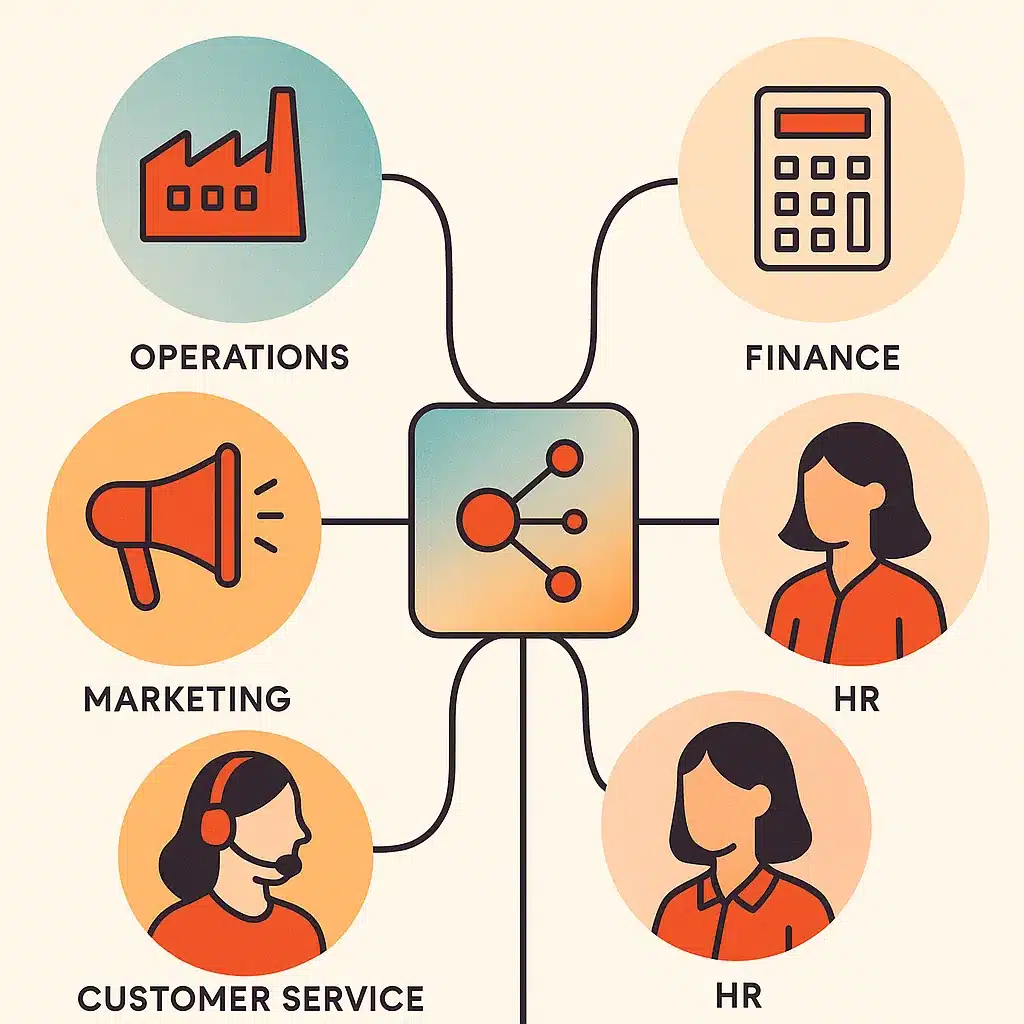
The pattern holds across departments. In operations, process automation moves data between systems and flags exceptions. AI in marketing uses generative AI to draft content and personalize campaigns from customer behavior, and predictive analytics to target the right audience. Customer service uses chatbots and ai agents to resolve routine inquiries around the clock, escalating only what needs a person.
AI in finance handles invoice processing, reconciliation, and anomaly detection, cutting the manual review that eats accounting time. AI in hr screens applications, answers policy questions, and automates onboarding paperwork. Even software development benefits, with AI drafting and reviewing code. The common thread is the same: workflow automation on repetitive tasks, freeing people for decision making and relationship work. The reason the same approach works in every function is that repetitive, rule-shaped work exists everywhere, only the specific documents change. The U.S. Bureau of Labor Statistics analysis of automation and occupations underscores that automation typically reshapes tasks within roles rather than erasing the roles outright.
Real examples of businesses using AI to cut manual effort
Look at what large adopters actually automate and the pattern is instructive. Amazon uses AI for supply chain optimization and product recommendations, both forecasting and personalization at scale. JPMorgan Chase applies it to speed up financial data processing, which is document-heavy review work. Meta uses ai in marketing to refine ad targeting.
Notice what these share: forecasting, personalization, and automating repetitive review. None of it is exotic. The same three uses translate directly to smaller operations. Take a common case: a distribution firm using demand forecasting to cut overstock, or a service firm using natural language processing to sort requests. The scale differs; the underlying ai use cases don't. Before chasing any of them, it's worth understanding how to calculate ROI on AI automation projects so the effort maps to a concrete return. That's why enterprise ai use cases are worth studying even for a ten-person team.
Automation and workflow optimization as the core use case
If there's one use case that tends to pay for itself repeatedly, it's workflow automation. Everything else, the personalization, the forecasting, the chatbots, serves the same goal: removing manual work from how your business actually runs. Workflow optimization means mapping a process, finding where humans do rote handoffs, and letting software carry that load.
The reason this beats piecemeal tool-buying is integration. A single AI tool solves one task. Connected automation removes the seams between tasks, where time leaks most. Picture a support team that answers tickets in one app, logs them in a second, and updates the customer record in a third: each handoff is a copy-paste, and each one is a chance to drop a detail or lose ten minutes. Bespoke Mind AI builds custom workflow automations and integrations fitted around an existing process rather than forcing a team onto off-the-shelf software. Solve the underlying problem, not the surface symptom, and the time savings can compound.
Small business vs enterprise AI use
- Focus on automating specific workflows
- Limited budgets and resources
- Requires precision in implementation
- Tools are now affordable at small scale
- Can deploy broadly and absorb failures
- Has data science teams and large budgets
- Rewards breadth in AI strategy
- Can run long pilots for testing
Enterprises have data science teams, large budgets, and the tolerance to run long pilots. Small businesses don't, and that's fine, because small business AI doesn't require any of that. The winning move for a smaller team is narrow: pick one recurring manual bottleneck and automate that specific workflow.
Enterprises can afford to deploy broadly and absorb failures. An SMB can't, so precision matters more. The good news is the tools have leveled. Process automation, ai agents, and business intelligence dashboards that once needed enterprise budgets are now within reach and genuinely affordable at small scale. Some pair this with predictive analytics to plan ahead. The difference is a sound ai strategy, not capability. Ai in business rewards focus at small scale and breadth at large scale, and confusing the two wastes money both ways.
Challenges and limitations of using AI (privacy, accuracy, workforce, trust)
AI isn't a set-and-forget fix, and pretending otherwise leads to expensive disappointment. Accuracy depends heavily on data quality. Feed a model inconsistent records and it produces confident, wrong answers. That is why data analytics hygiene matters, whether you run reporting, business intelligence, or market research on that data. Privacy is a real constraint where customer or employee data is involved, so check your relevant data protection regulations or a qualified advisor first.
Trust is the quieter challenge. Teams won't use a system they don't understand or can't override. Over-automating a process that still needs human judgment breaks that trust fast, and once a team stops trusting a tool, they route around it and you lose the whole investment. Workforce concern is legitimate too. The honest framing is task reduction, not headcount elimination. Results vary based on existing processes, business complexity, ai implementation, and team adoption, and any vendor claiming guaranteed outcomes is selling hype.
How to tell which manual work in your business is worth automating
Not every repetitive task deserves automation. The ones that do share three traits: they happen often, they follow a mostly consistent pattern, and they currently cost real time or cause errors. Score your candidate processes against those and the priorities sort themselves out.
Start by tracking where your team's hours actually go for a week. The tasks that show up daily and drain the most time are your first targets. Ask whether the process has clear rules or too many one-off exceptions. Heavy exceptions favor artificial intelligence, while rigid steps often suit simpler automation and sharper decision making. Running an AI readiness audit of your operations formalizes this. It assesses data quality, integration, and which workflows are stable enough to automate before anyone builds. That assessment is where a sensible ai strategy begins.
Custom-built AI systems vs off-the-shelf tools for removing manual work
- Best for standard needs and features
- Quick to implement and use
- May force workarounds if mismatched
- Cost-effective for common tasks
- Tailored to unique business processes
- Eliminates data silos and disconnection
- Can be cheaper over time with efficiency
- Avoids workarounds that add unpaid labor
Off-the-shelf software wins when your need is standard. A generic chatbot, a scheduling tool, a common CRM feature: buy those and move on. The trouble starts when packaged tools force your team to work around them. That's the tell that your process doesn't match the software's assumptions.
Custom-built systems fit the opposite situation: disconnected tools, data silos, and workflows unique to how your business runs. These custom-built systems earn their cost through fit and lasting operational efficiency. The deciding question is simple. Does the option handle your process, or does your team invent workarounds? When workarounds pile up, custom is often cheaper over time, because every workaround is unpaid labor repeated daily. Bespoke Mind AI designs custom AI solutions built around how your business operates and internal tools around a client's actual workflow. It builds scalable systems, a matter of ai implementation done right, instead of reselling software that half-fits. If you want to see the engagement model, it's worth reviewing how Bespoke Mind AI scopes and builds AI projects from discovery through handoff.

If repetitive work is slowing your team down, the practical first step is identifying which workflows are actually worth automating. Bespoke Mind AI runs discovery-led assessments to map your bottlenecks and scope custom automation around how your business operates. Book a discovery call to find your automation opportunities and see where the time savings are.
The takeaway is narrow and practical: businesses using ai well aren't chasing a platform, they're removing one manual bottleneck at a time and letting the results compound. Start with the task that eats the most hours, confirm your data can support it, and build from there.
Frequently Asked Questions
What are the most common ways businesses are actually using AI right now?
The four most widespread applications are customer service automation (chatbots handling routine inquiries), marketing and sales personalization, supply chain and demand forecasting, and data analysis for decision-making. These cover front-office customer tasks and back-office operational work, which is where most manual effort tends to pile up.
Which well-known companies are getting real results from AI?
Amazon uses AI for supply chain optimization and product recommendations, JPMorgan Chase applies it to speed up financial data processing, and Meta uses it to refine ad targeting. These are large-scale examples, but the same underlying uses:forecasting, personalization, and automating repetitive review work:apply at a smaller scale for SMBs.
How can a small business use AI without a large budget or technical team?
Small businesses typically start with 24/7 automated customer support, automated content and marketing personalization, and offloading repetitive admin tasks so staff can focus on higher-value work. The practical entry point is identifying one recurring manual bottleneck and automating that specific workflow rather than adopting AI everywhere at once.
How is AI different from the traditional automation we already use?
Traditional automation follows fixed, rule-based instructions and works well for predictable, repetitive tasks, but it struggles with exceptions and needs human intervention. AI systems can analyze large datasets, adapt to variation, and handle unstructured inputs:making them useful where rigid rule-based tools break down.
Is adopting AI actually worth it, or is it just hype?
The measurable payoff comes from specific outcomes: reduced manual work, faster decisions from data, and fewer errors on repetitive tasks. It's worth it when tied to a defined bottleneck with a clear before-and-after cost, and it's usually not worth it when adopted as a general "we should have AI" initiative without a target process.
What are the real risks of a business using AI?
Common risks include poor data quality producing unreliable outputs, over-automating processes that still need human judgment, and integration problems when AI is bolted onto disconnected systems. Running a readiness assessment before building helps confirm your data and workflows are stable enough to automate reliably.
Will AI replace the jobs on my team?
In most SMB deployments AI removes repetitive tasks:data entry, routine responses, report generation:rather than whole roles, freeing staff for work that needs judgment and relationship handling. The practical framing is task reduction, not headcount reduction, which is why implementation should map to specific manual workflows.
Should I buy off-the-shelf AI software or build something custom?
Off-the-shelf tools are fastest for common, standardized needs like generic chatbots, while custom builds fit businesses with disconnected systems or workflows that don't match packaged software. The deciding factor is whether your process is standard enough that generic software won't force your team to work around it.