

A finance team at a 40-person firm spent three days every month chasing signatures on expense reports. The work wasn't hard. Nobody could see where each report sat, who had it, or why it stalled. That's the gap process and workflow management fills. It turns invisible, manual handoffs into a defined sequence that runs the same way every time. This guide walks through what workflow management is, the pieces that make up a workflow, the tools involved, and how to build systems around how your business really operates.
What is workflow management (definition)
Workflow management is the practice of designing, running, and improving the sequence of tasks that move work from start to finish. It covers four repeating stages. You design the steps and roles, execute them through software, monitor how they perform, then optimize based on what the data shows. Done well, it removes the guesswork about who owns what and when. The U.S. Small Business Administration's guide on managing your business makes a point worth repeating: consistent routines are what let a small company grow without breaking. Good workflow management makes those routines repeatable instead of dependent on one person remembering the steps.
Workflow vs. process vs. business process management (BPM)
- Specific order of steps in a process
- Example: screen resume, interview, send offer
- Focuses on execution of tasks
- Discipline governing workflows over time
- Frames BPM as continuous improvement
- Ties strategy and execution together
These three terms get mixed up constantly, and the difference matters. A process is the big picture: inputs turned into outputs, like hiring a candidate. A workflow is the specific order of steps inside that process, like screen resume, then interview, then send offer. Business process management is the discipline that governs both, analyzing and refining entire business workflows over time. For a mixed-expertise team, it helps to start from Gartner's definition of business process management, which frames it as a discipline for improving and governing end-to-end work. Think of process management as the strategy, workflow management as the execution, and business process management as the ongoing loop tying them together. The Association for Intelligent Information Management's BPM resources frame BPM as continuous improvement rather than a one-time fix, which is exactly how it should be treated. If you want a hands-on look at putting this into action, our practical guide to business process automation breaks down the steps in more detail.
Key elements of a workflow (stakeholders, inputs, outputs, steps, conditions)
Every workflow breaks down into the same core parts. The elements of a workflow are: stakeholders (who does the work and who approves it), inputs (the data or documents that start things), steps (the ordered actions), conditions (the rules that decide what happens next), and outputs (the finished result). Miss any one and the workflow leaks. In our experience, most bottlenecks trace back to an undefined condition. Picture a step where nobody knew what to do when an invoice exceeded a threshold, so it sat untouched for a week while two people each assumed the other owned it. Naming these elements up front is what makes automation possible later, because software can only act on rules you've actually written down.
Types of workflows (sequential, parallel, state machine, rules-driven)
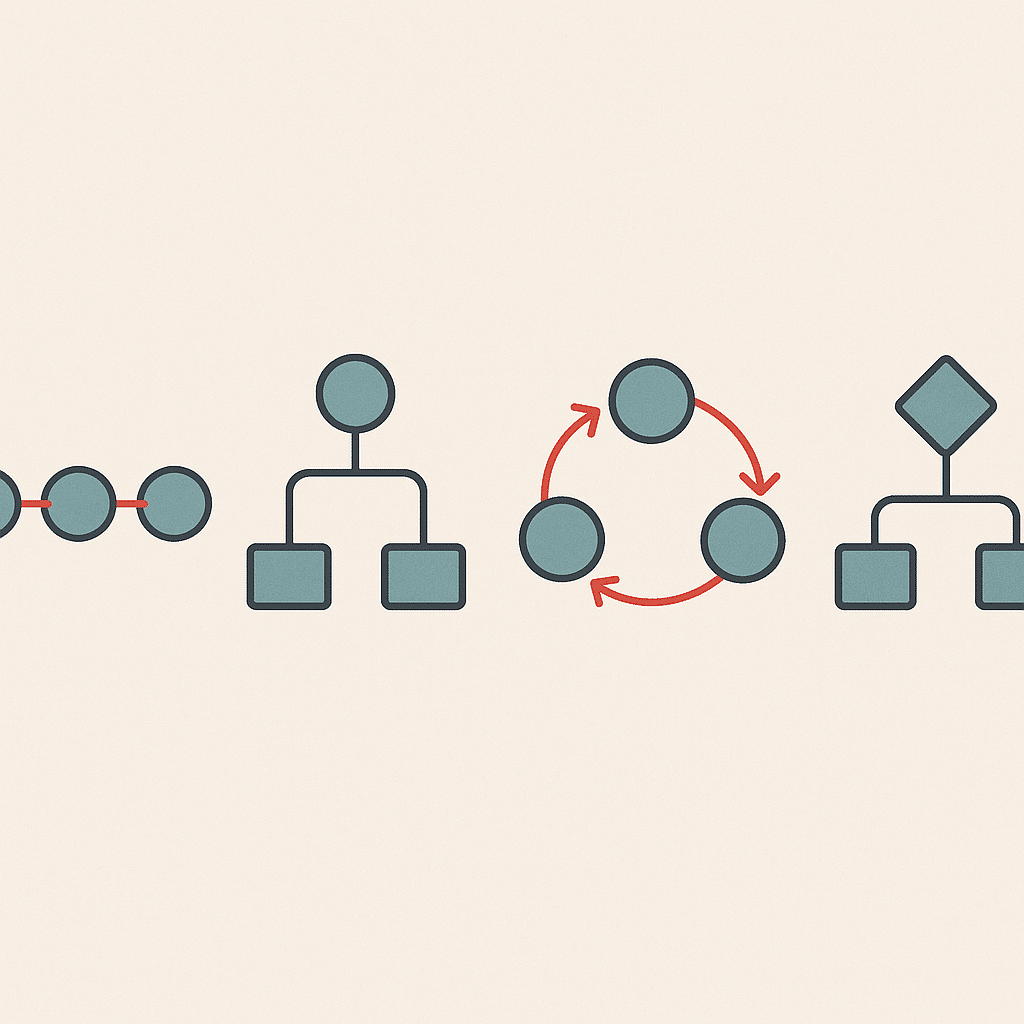
Not every process moves in a straight line, and matching the right pattern to the work saves real time. Sequential workflows run one step after another: step two can't start until step one finishes, like a purchase order approval chain. Parallel workflows split tasks so several people work at once, useful when three departments review a contract at the same time. State machine workflows loop between stages that can move backward or forward depending on status, common in support tickets that reopen. Rules-driven workflows branch based on conditions, routing a $500 expense to a manager and a $50,000 one to the CFO. Knowing these types of workflows lets you design for how the work actually behaves.
Benefits of workflow management and automation
The benefits of workflow management show up fastest where repetitive tasks pile up. When approvals, data entry, and status updates run automatically, teams stop spending hours on manual work. Errors drop because every case follows the same standardized path, which removes the variation that creeps in when each person handles a task their own way. Business process automation also gives leaders operational visibility they didn't have before. You can see exactly where a job sits without asking three people. The time savings can compound too. An hour saved daily on routine handoffs is roughly 250 hours a year per person, potentially redirected toward higher-value work, a shift that aligns with U.S. Bureau of Labor Statistics data on productivity and how output per hour translates into real gains. The other real benefit is that operational efficiency becomes measurable, so you can track improvement rather than assume it. If you're weighing the numbers, it helps to know how to calculate ROI on automation projects before committing.
Workflow mapping and visualization
You can't automate what you can't see, which is why workflow mapping comes first. Mapping means laying out every step, decision point, and handoff in a process visually, usually as a flowchart, so the whole team looks at the same picture. This surfaces the ugly parts fast: the duplicate approval, the step where a file gets emailed back and forth four times, the handoff nobody owns. Many assume mapping is a formality that slows a project. In reality, it's where much of the process improvement often happens, before a single tool gets configured, because you can't fix a bottleneck you haven't located. A good map turns vague complaints about "things being slow" into specific bottlenecks you can actually work on.
Best practices for workflow management success
A few best practices separate workflows that stick from ones that get abandoned. Start small: automate one high-friction process fully before touching the next, rather than trying to redesign everything at once. Involve the people who do the work daily, because they know the exceptions the map misses. Set clear metrics up front, like approval time or error rate, so you can tell whether the change worked. Keep the design simple; complexity is the enemy of scalable workflows. And review regularly, because business operations shift and a workflow that fit last quarter may now create friction. These practices apply whether you're using off-the-shelf workflow management software or custom-built systems.
Overcoming workflow management challenges
Most workflow management projects stall for predictable reasons. The biggest is team adoption. A beautifully designed workflow fails the moment people quietly revert to their old spreadsheet. The root cause is usually that the new process was built for them instead of with them, so it ignores the exceptions they handle every day. Another common challenge is trying to automate a broken process. Automation just makes a bad workflow run faster, so fix the design first, then automate. Overly rigid rules also cause trouble, blocking legitimate exceptions and pushing people to work around the system. Address these by rolling out changes gradually, training on the why, and building in a clear path for the edge cases every real process has.

Workflow management tools and software categories
Workflow management tools fall into a few practical categories. Task and project platforms handle assignments, deadlines, and visibility for team-based business workflows. Workflow management tools that automate connect triggers and actions, so a form submission can create a record and notify the right person without manual work. Low-code no-code platforms let non-developers build simple task automation with drag-and-drop logic. Integration platforms sit between your apps, passing data between disconnected systems. For anything beyond standard patterns, custom-built systems and internal tools fill the gap. Here's the honest truth about workflow software: the category matters less than the fit. The best tool is the one that matches how your team already works, not the one with the longest feature list. That's the case for custom AI solutions built around how you operate rather than forcing your work into a template.
Workflow use cases and real-world examples
Workflow use cases turn the theory concrete. Employee onboarding is a classic: creating accounts, assigning training, and scheduling an intro meeting, each step triggering the next so nothing gets forgotten. Invoice approval routing sends amounts to the right approver automatically based on value. Customer support ticketing uses state machine logic to move issues through open, pending, and resolved. In real estate, a lead-to-closing workflow keeps documents, disclosures, and deadlines from slipping through the cracks, though the exact compliance steps vary by state and jurisdiction, so check with your local governing authority before automating them. One professional services firm cut its client onboarding from nine days to three by mapping the handoffs and automating the reminders. These use cases share a pattern: they replace fragile human memory with a defined sequence.
The future of workflow management and AI
AI is shifting workflow management from rule-following to something more adaptive. Older automation could only execute conditions you spelled out. AI systems can now read an incoming email, classify it, extract the relevant details, and route it, work that used to require a human. AI agents can handle steps that involve judgment, like drafting a response or summarizing a document, then hand off to a person for the final call. This doesn't replace teams; it removes the tedious middle. Results vary based on existing processes, business complexity, and how well the workflow was mapped to begin with. A realistic near-term direction is AI helping with the repetitive judgment calls while people focus on the exceptions and decisions that matter.
Building custom systems around how your business actually operates
Off-the-shelf workflow software assumes your business fits its template. Most don't. When a company has a process that doesn't match any standard tool, forcing the work into that tool creates its own bottlenecks. Custom-built systems flip this: the software is designed around your actual workflow, not the other way around. This is where custom systems can earn their cost, by removing the manual work that generic tools leave behind and building scalable workflows that grow with you. Business process automation works best when it's built around how your team already operates. The goal isn't more software. It's less manual work and a system that fits your business operations. Before you build, it's worth running an AI readiness audit of your operations to see where the real opportunities are.

Reducing founder dependency and improving operational visibility
In founder-led businesses, too much knowledge lives in one head. The founder knows which client needs handling personally, which vendor is unreliable, and which step gets skipped when things are busy. That's a fragile setup. If that person takes a week off, work stalls. Documenting and automating these business workflows moves the knowledge out of one person's memory and into internal tools the whole team can run. It also improves operational visibility. With process management in place, leaders see status, throughput, and delays on a dashboard instead of chasing updates. The payoff is a business that can keep running smoothly whether or not the founder is in the room.
Connecting disconnected systems and integrations for a single source of truth
The most common operational problem isn't a missing tool. It's too many tools that don't talk to each other. Sales data sits in one platform, finance in another, operations in a spreadsheet, and someone spends afternoons copying numbers between them. Disconnected systems create errors, delays, and reporting you can't trust. Integrations solve this by connecting your existing tools so data flows automatically into a single source of truth. This is often where the fastest operational efficiency gains hide, because you improve operations without adding another app. Connecting what you own often beats buying more, and it removes the manual work of moving data between systems by hand. Good process and workflow management, in the end, is less about the tools you buy and more about the friction you remove.
If repetitive work or scattered tools are slowing your team down, a short conversation can help pinpoint where task automation and better process and workflow management would actually help. Book a discovery call with Bespoke Mind and we'll look at how your business operates and where custom systems could remove the manual effort. No pressure, just a practical look at the opportunities.
Frequently Asked Questions
What's the actual difference between process management and workflow management?
Process management takes the wide view:designing, analyzing, and optimizing an entire business process end to end. Workflow management is narrower, coordinating and automating the specific sequence of tasks inside that process, like routing an expense report through its approval steps.
How does process and workflow management work in practice?
It runs on four repeating stages: design (mapping tasks, roles, and sequences), execution (running the work through software), monitoring (tracking performance metrics), and optimization (using data to fix bottlenecks). A process turns inputs into outputs, while the workflow dictates the order in which each step happens.
Can you give a simple example of a managed workflow?
Employee onboarding is a common one: create the account, assign training, and schedule an introductory meeting, each step triggering the next. Structuring it this way removes redundant handoffs and stops tasks from being forgotten.
What skills do I need to manage workflows well?
The core abilities are identifying, organizing, and coordinating a set of tasks, then spotting where they can be optimized or automated. The goal is to increase output, cut repetition, and reduce errors across a project.
Is investing in process and workflow management actually worth it for a small team?
The return shows up as productivity gains from automating routine tasks and fewer errors from standardized steps, which matters most when a few people carry heavy operational load. For founder-led businesses, it also reduces the dependency on one person holding all the knowledge.
What if I already have several tools:won't more software just add complexity?
More tools often make things worse when information lives in disconnected platforms. The fix isn't buying another app; it's building systems that connect your existing tools and remove the manual work of moving data between them.
How do I roll out process and workflow management in my company?
Start by mapping current workflows to find inefficiencies, then define clear objectives like cutting costs or speeding up delivery. Redesign the workflows around those goals, automate the repetitive steps, and monitor performance so you can keep refining.
Which tools are commonly used for this?
Widely recognized options include Asana for task tracking and timelines, Trello for Kanban-style boards, Monday.com for customizable workflow automation, and Smartsheet for spreadsheet-based project management. The right choice depends on how your team actually works, not the feature list.